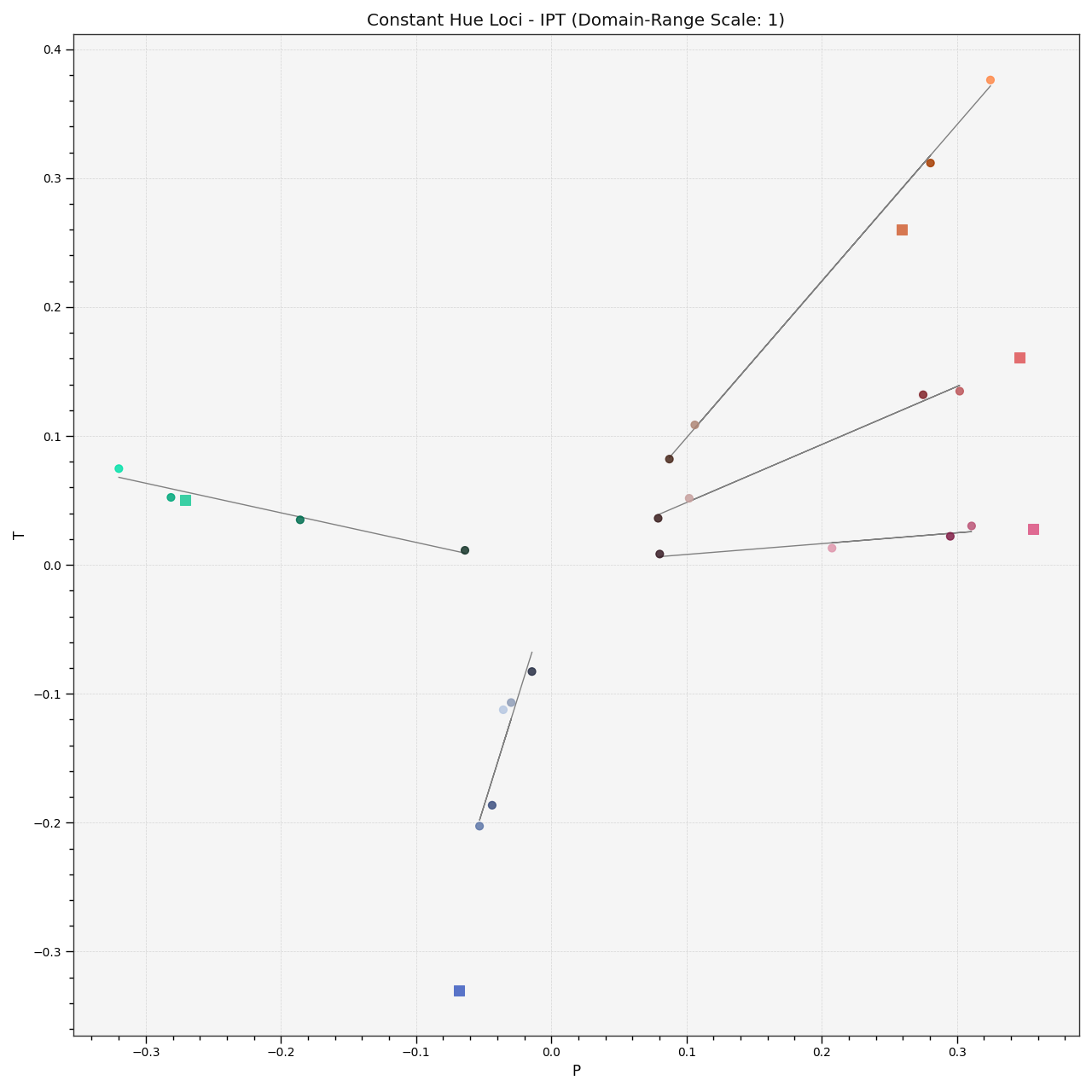
colour.plotting.plot_constant_hue_loci
- colour.plotting.plot_constant_hue_loci(data, model, scatter_kwargs=None, **kwargs)[source]
Plots given constant hue loci colour matches data such as that from [] or [] that are easily loaded with Colour - Datasets.
- Parameters
data (array_like) –
Constant hue loci colour matches data expected to be an array_like as follows:
[
    ('name', XYZ_r, XYZ_cr, (XYZ_ct, XYZ_ct, XYZ_ct, ...), {metadata}),
    ('name', XYZ_r, XYZ_cr, (XYZ_ct, XYZ_ct, XYZ_ct, ...), {metadata}),
    ('name', XYZ_r, XYZ_cr, (XYZ_ct, XYZ_ct, XYZ_ct, ...), {metadata}),
    ...
]
where
nameis the hue angle or name,XYZ_rthe CIE XYZ tristimulus values of the reference illuminant,XYZ_crthe CIE XYZ tristimulus values of the reference colour under the reference illuminant,XYZ_ctthe CIE XYZ tristimulus values of the colour matches under the reference illuminant andmetadatathe dataset metadata.model (unicode, optional) – {‘CIE XYZ’, ‘CIE xyY’, ‘CIE xy’, ‘CIE Lab’, ‘CIE LCHab’, ‘CIE Luv’, ‘CIE Luv uv’, ‘CIE LCHuv’, ‘CIE UCS’, ‘CIE UCS uv’, ‘CIE UVW’, ‘DIN 99’, ‘Hunter Lab’, ‘Hunter Rdab’, ‘IPT’, ‘JzAzBz’, ‘OSA UCS’, ‘hdr-CIELAB’, ‘hdr-IPT’}, Colourspace model.
scatter_kwargs (dict, optional) –
Keyword arguments for the
plt.scatter()definition. The following special keyword arguments can also be used:c : unicode or array_like, if
cis set to RGB, the scatter will use the colours as given by theRGBargument.
**kwargs (dict, optional) – {
colour.plotting.artist(),colour.plotting.plot_multi_functions(),colour.plotting.render()}, Please refer to the documentation of the previously listed definitions. Also handles keywords arguments for deprecation management.
- Returns
Current figure and axes.
- Return type
References
[], [], []
Examples
>>> data = np.array([
...     [
...         None,
...         np.array([0.95010000, 1.00000000, 1.08810000]),
...         np.array([0.40920000, 0.28120000, 0.30600000]),
...         np.array([
...             [0.02495100, 0.01908600, 0.02032900],
...             [0.10944300, 0.06235900, 0.06788100],
...             [0.27186500, 0.18418700, 0.19565300],
...             [0.48898900, 0.40749400, 0.44854600],
...         ]),
...         None,
...     ],
...     [
...         None,
...         np.array([0.95010000, 1.00000000, 1.08810000]),
...         np.array([0.30760000, 0.48280000, 0.42770000]),
...         np.array([
...             [0.02108000, 0.02989100, 0.02790400],
...             [0.06194700, 0.11251000, 0.09334400],
...             [0.15255800, 0.28123300, 0.23234900],
...             [0.34157700, 0.56681300, 0.47035300],
...         ]),
...         None,
...     ],
...     [
...         None,
...         np.array([0.95010000, 1.00000000, 1.08810000]),
...         np.array([0.39530000, 0.28120000, 0.18450000]),
...         np.array([
...             [0.02436400, 0.01908600, 0.01468800],
...             [0.10331200, 0.06235900, 0.02854600],
...             [0.26311900, 0.18418700, 0.12109700],
...             [0.43158700, 0.40749400, 0.39008600],
...         ]),
...         None,
...     ],
...     [
...         None,
...         np.array([0.95010000, 1.00000000, 1.08810000]),
...         np.array([0.20510000, 0.18420000, 0.57130000]),
...         np.array([
...             [0.03039800, 0.02989100, 0.06123300],
...             [0.08870000, 0.08498400, 0.21843500],
...             [0.18405800, 0.18418700, 0.40111400],
...             [0.32550100, 0.34047200, 0.50296900],
...             [0.53826100, 0.56681300, 0.80010400],
...         ]),
...         None,
...     ],
...     [
...         None,
...         np.array([0.95010000, 1.00000000, 1.08810000]),
...         np.array([0.35770000, 0.28120000, 0.11250000]),
...         np.array([
...             [0.03678100, 0.02989100, 0.01481100],
...             [0.17127700, 0.11251000, 0.01229900],
...             [0.30080900, 0.28123300, 0.21229800],
...             [0.52976000, 0.40749400, 0.11720000],
...         ]),
...         None,
...     ],
... ])
>>> plot_constant_hue_loci(data, 'IPT')
(<Figure size ... with 1 Axes>, <...AxesSubplot...>)